The proxy
The credgate proxy sits between people's tools and the model endpoints. Every request goes through the policy: what may be sent is sent, identifiers are redacted or tokenised as the policy says, requests the policy blocks never leave, and every decision is written to the audit log. Tokenised values are put back into the answer, so people see the real values while the model never did.
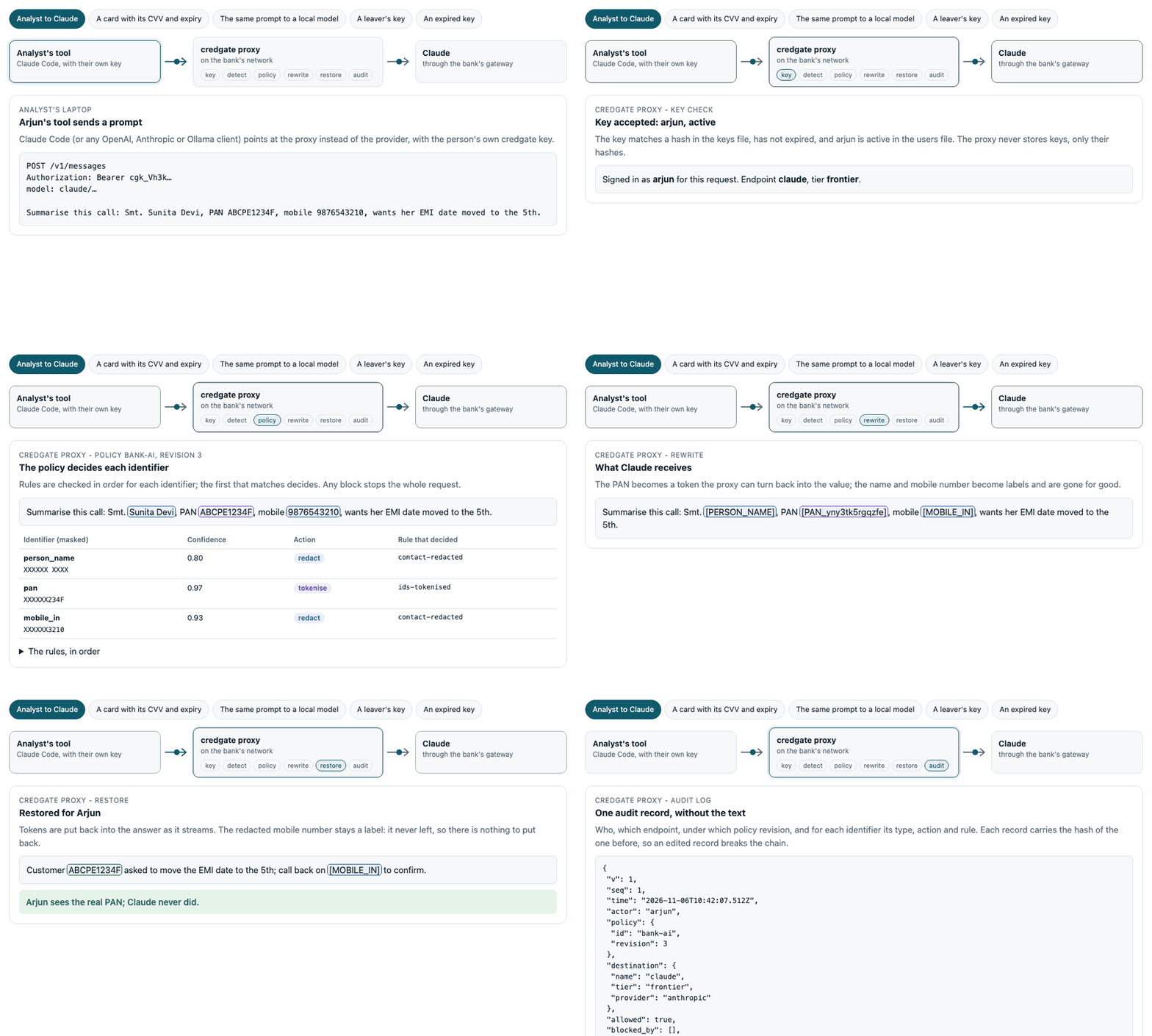
Step through it yourself, with other scenarios: How it works.
Claude Code / Copilot Chat / Positron / Jupyter / scripts ──► credgate proxy ──► Ollama · vLLM · SGLang · Claude · gateway
                                           policy: allow / redact / tokenise / block
                                           values restored in the answer
                                           audit log
It speaks three APIs, and forwards each request to an endpoint that speaks the same one:
| API | Paths | Used by |
|---|---|---|
| OpenAI-compatible | POST /v1/chat/completions, GET /v1/models |
vLLM, SGLang, LM Studio, company gateways, most tools |
| Anthropic | POST /v1/messages, /v1/messages/count_tokens |
Claude Code, the Anthropic SDKs |
| Ollama | POST /api/chat, /api/generate, /api/show; GET /api/tags, /api/version |
Ollama clients, Open WebUI, VS Code Copilot Chat with Ollama models |
Answers stream as the model writes them, in each API's own format, with tokenised values put back as they arrive. It needs only the Python standard library.
Set up the endpoints
The endpoints are the destinations of the policy, each with its tier and its
base URL. quickstart.yaml
uses the public APIs (Anthropic, OpenAI, a local Ollama), for trying the
proxy; bank-default.yaml
shows an organisation's own setup, with internal model servers and a gateway:
destinations:
  ollama-local: {tier: local, url: "http://localhost:11434/v1"}
  vllm-gpu: {tier: internal, url: "https://llm.bank.internal/v1"}
  claude: {tier: frontier, url: "https://api.anthropic.com/v1"}   # or the bank's gateway
  copilot: {tier: frontier, blocked: true}
The proxy adds the API's path to the URL: /chat/completions (OpenAI),
/messages (Anthropic). For the Ollama API it uses the URL without its
/v1, so http://localhost:11434/v1 serves both Ollama's OpenAI-compatible
API and its own.
The endpoints' own API keys stay with the proxy, in environment variables
named after the destination: CREDGATE_UPSTREAM_KEY_VLLM_GPU,
CREDGATE_UPSTREAM_KEY_CLAUDE. People using the proxy never see them. They
are sent as Authorization: Bearer (OpenAI, Ollama) or x-api-key
(Anthropic). In localhost mode, for an endpoint without such a key, the
user's own key goes on instead - for example Claude Code signed in to the
user's account. Shared mode never passes a client's key on: there it is the
client's credgate key.
Run it
On each analyst's machine (localhost mode): the proxy listens on
127.0.0.1 only, and requests are recorded as the operating-system user. To
try it, download the quickstart policy (and, optionally, its tests):
curl -O https://raw.githubusercontent.com/dwarpal/credgate/main/examples/policies/quickstart.yaml
curl -O https://raw.githubusercontent.com/dwarpal/credgate/main/examples/policies/quickstart.tests.yaml
credgate proxy serve --policy quickstart.yaml --audit audit.jsonl
For a team (shared mode): the proxy listens on a network address and
every client needs its own key; requests are recorded by user name. The proxy
refuses to start on a network address without a keys file. Here and below,
policy.yaml is your organisation's policy - for example adapted from
bank-default.yaml.
credgate proxy add-user priya --keys keys.json      # prints Priya's key, once
credgate proxy serve --policy policy.yaml --audit audit.jsonl \
  --host 0.0.0.0 --keys keys.json --certfile proxy.pem --keyfile proxy.key
The keys file holds only hashes of the keys. Use TLS (--certfile,
--keyfile) or put the proxy behind the organisation's TLS-terminating
reverse proxy.
Managing users
Each person gets one key, made with add-user and shown once: hand it
to them over a channel you trust. They put it where their tool takes an API
key (for Claude Code ANTHROPIC_API_KEY, for the OpenAI SDK and similar
tools api_key), with the tool's base URL pointed at the proxy. They never
see the endpoints' own keys, which stay on the server
(CREDGATE_UPSTREAM_KEY_<NAME>).
credgate proxy add-user    priya --keys keys.json --days 90   # new user; prints the key once
credgate proxy rotate-key  priya --keys keys.json             # new key; the old one stops working
credgate proxy remove-user priya --keys keys.json             # the key stops working
credgate proxy list-users        --keys keys.json             # names, dates and status - never keys
- Keys expire. A key is valid for 1 to 180 days (
--days, default 90). An expired key is refused with a message saying when it expired;list-usersshows keys that expire within 7 days as "expires soon", androtate-keygives the person a new one. - Changes reach a running proxy at its next reload - within the
interval with
--watch, or on SIGHUP (systemctl reload). No restart, no dropped requests; see Rolling out a new revision. - Only hashes are stored.
keys.jsonholds the SHA-256 of each key and its dates, and is readable by its owner only; someone who reads it cannot use the keys. The last user cannot be removed. - Leavers lose access with the users file. Start the proxy with the
app's users file (
--users users.yaml, see the policy editor): a key whose owner is not in it, or is marked inactive (credgate users deactivate ravi), is refused with "no longer has access", even before the key expires. The users file reloads with the keys file. - Unused keys expire. Run
credgate proxy expire-unused --keys
  keys.json --audit audit.jsonl
daily (cron): keys not used for 60 days (--days) - judged from the audit log - are expired; the person can be given a new one. Keys made in that time are left alone. - The same is available from Python:
credgate.proxy.add_user,rotate_key,remove_userandlist_users. The file's format is in the specification.
Choose the server
The proxy runs on one of two HTTP servers, with the same code for everything else (policy, audit, streaming) and the same tests:
--server standard (default) |
--server uvicorn |
|
|---|---|---|
| For | one person, on their own machine | a shared proxy for a team |
| Needs | nothing: the Python standard library | pip install 'credgate[server]' |
| HTTP | Python's http.server, hardened by credgate |
uvicorn (BSD-3), a production server |
| Requests in progress | unlimited | --concurrency per worker (default 256); more get 503 with Retry-After |
| A client that leaves | noticed at the next piece of the answer | noticed at once, even while the model is still thinking |
| Request bodies | Content-Length only |
Content-Length or chunked |
Python's own documentation does not recommend http.server for
production, so run shared proxies on uvicorn:
pip install 'credgate[server]'
credgate proxy serve --server uvicorn --workers 4 --policy policy.yaml \
  --audit /var/log/credgate/audit.jsonl --host 0.0.0.0 --keys keys.json \
  --certfile proxy.pem --keyfile proxy.key
credgate[server] adds uvicorn and its parsers (httptools, uvloop), all
BSD-3 or MIT licensed. For a proxy reachable from outside a trusted network,
put a reverse proxy such as nginx (BSD-2), Envoy or Caddy (Apache-2.0) in
front for TLS and slow-client protection, as is usual for any Python server.
Custom detectors - your own account numbers or customer ids - are loaded
with --detectors file.yaml, or from the policy's detectors list; see
custom detectors.
Point tools at it
Clients ask for a model as <endpoint>/<model>:
from openai import OpenAI

client = OpenAI(base_url="http://127.0.0.1:8790/v1", api_key="unused")  # shared mode: the user's key
client.chat.completions.create(
    model="vllm-gpu/llama-3.1-70b",
    messages=[{"role": "user", "content": "Summarise: customer PAN ABCPN1234K wants ..."}],
)
In R with ellmer:
chat <- ellmer::chat_openai_compatible(
  base_url = "http://127.0.0.1:8790/v1", model = "ollama-local/gemma3:1b",
  credentials = function() "unused"   # shared mode: function() Sys.getenv("CREDGATE_PROXY_KEY")
)
chat$chat("Summarise this call note: ...")
Any tool with an "OpenAI-compatible base URL" setting works the same way.
Claude Code
Claude Code asks for its own model names (claude-sonnet-...), without an
endpoint, so start the proxy with a default endpoint for them:
curl -O https://raw.githubusercontent.com/dwarpal/credgate/main/examples/policies/quickstart.yaml
credgate proxy serve --policy quickstart.yaml --audit audit.jsonl --default-endpoint claude
ANTHROPIC_BASE_URL=http://127.0.0.1:8790 claude
Every message, file it reads and tool result then goes through the policy
for the claude endpoint. Shared mode: also set ANTHROPIC_API_KEY to the
user's credgate key. Images (screenshots, pasted pictures) cannot be checked
and are refused.
VS Code Copilot Chat
Copilot Chat can use models other than GitHub's ("bring your own key",
VS Code 1.117 and later; on Copilot Business and Enterprise the organisation
must allow it). Add Ollama models in Chat: Manage Language Models and
set the Ollama address to the proxy (http://127.0.0.1:8790): the models
of every endpoint in the policy are listed, as <endpoint>/<model>, and every
chat request goes through the policy. A custom OpenAI-compatible provider
pointed at http://127.0.0.1:8790/v1 works the same way. Copilot's inline
code completions still go to GitHub, not through the proxy.
What it does with a request
- Who: the operating-system user (localhost mode) or the user whose key
was sent (shared mode); otherwise
401. - Where: the endpoint named in
model(or--default-endpointfor a model without one); an endpoint not in the policy is refused (404). - What: every value in the request is checked with the policy for that
endpoint - message contents and text parts, tool results, tool-call
arguments from earlier turns, names,
metadata,user, stop sequences, tool and schema descriptions, and any field the proxy does not know - except structural ones (model,role,type, ids, function names). Whole numbers of 6 digits or more are checked too (an Aadhaar number can be sent as a number); a numeric setting shaped like an identifier would be redacted and the request fail, never leak. Requests with personal data in a field name, content credgate cannot read (images, audio, files) or unexpected shapes are refused (400) rather than sent unchecked - also Anthropic content blocks other than text, tool use, tool results and thinking. Thinking signatures and encrypted thinking are passed on as they are: the provider checks them, and no one can read them. - Decision: blocked requests get
403with the rule that blocked them and are never forwarded; otherwise identifiers are redacted or tokenised as the policy says. Every decision, blocked or not, is written to the audit log - without the text or the values. - Answer: tokens in the answer's text are replaced by their values -
only tokens made for this request, never in tool calls (which the tool
would run with real values). Streamed answers are passed on piece by
piece; a piece that ends with what could be the start of a token
(
[PAN_) is held back until the next piece shows whether it is one, so a token split across pieces is restored like any other. If the client goes away, the proxy stops reading from the endpoint. If the endpoint fails once the answer has started, the stream ends with an error event in the API's own format.
It fails closed: if anything goes wrong before the request is forwarded -
including a failure to write the audit record - nothing is sent and the
client gets an error. Requests go only to the URL in the policy (http or
https): redirects are not followed. Bodies must have a Content-Length
(at most 20 MB), connections are closed after any refused request, slow
clients are dropped after 2 minutes, and answers above 50 MB are refused. The proxy's own log line per
request has who, where, the status and the time taken - never the text.
Performance and scaling
Detection is CPU work: one worker process checks about 0.2-0.4 MB of text
per second, depending on the core - about 40 requests of 5 KB, or 300 short
messages, per second. --workers N runs N processes on one port, one core
each (Linux and macOS). Measured on a 4-core 2019 laptop
(details):
| Request | 1 worker | 4 workers |
|---|---|---|
| One customer record (0.3 KB) | 330 requests/s | 757 requests/s |
| 20 records (5 KB) | 42 requests/s | 139 requests/s |
| 200 records (51 KB) | 5 requests/s | 15 requests/s |
On uvicorn (--server uvicorn) one worker handles about the same; with
four workers about 70-80% of the requests of the standard server, and
streamed answers slightly faster
(details).
Streamed answers: one worker passes on about 9,000 pieces per second - roughly 100-300 answers streaming at once at a real model's pace - and the first piece of a short answer arrives about 4 ms after the model sends it.
In those runs (47,410 requests, up to 32 clients in parallel) every answer was restored exactly, no identifier reached the endpoint, and the audit chain stayed intact. With a real model its own time dominates: the proxy adds a few milliseconds to a short message.
Behind a load balancer
Every request is self-contained - it carries its whole conversation, is tokenised with its own vault and audited on its own - so any instance can take any request: no sticky sessions, no shared state.
- Health checks:
GET /healthzanswers200 {"status": "ok", "policy": {"id": ..., "revision": ...}, "loaded_at": ..., "last_reload": ...}without a key, so a balancer can poll it; checking the revision also shows every instance runs the same policy (see Rolling out a new revision). - Rolling restarts: on SIGTERM an instance answers
503 drainingon/healthzwhile it keeps serving for--drain-seconds(default 5; set it above the balancer's health-check interval), then stops accepting and finishes the requests in progress. Ctrl-C stops at once. - Overload: on uvicorn, a worker with
--concurrencyrequests in progress answers further ones503at once, withRetry-After: 1, so the balancer can send them elsewhere;/healthzis always answered. - Tracing: an
X-Request-IDheader from the balancer is written to the proxy's log line and returned. - TLS: terminate it at the balancer, or give each instance
--certfile/--keyfile. - Shared mode: instances listen on a network address, so each needs the keys file; share the same keys file and policy.
- Audit retention: the proxy starts a new audit file each month
(
audit.2026-11.jsonl, ...; one chain across them) and removes months older than--audit-retention-years(default 5, at least 1; 0 keeps all) at start and once a day.--no-audit-rotatekeeps one file. - Audit logs: one file per instance (for example
--audit /var/log/credgate/audit-$(hostname).jsonl). Concurrent writers are safe on a local disk, but file locking is unreliable on network file systems, and one chain per instance stays verifiable; collect them afterwards.
Rolling out a new revision
A policy changes by saving a new revision - in the policy editor, or in a reviewed pull request. A running proxy picks it up without a restart, and without dropping a request:
- On SIGHUP (
systemctl reload credgate-proxy,kill -HUP <pid>, an Ansible handler): the main process passes it to every worker and each reloads. - With
--watch SECONDS: the proxy checks the policy, its custom detector files and the keys file that often, and reloads when one changes. Use it where files are updated in place - a Kubernetes ConfigMap, a shared folder the editor saves to.
Nothing broken goes live. The new revision is checked completely
before it replaces the running one: the policy and every detector file it
names (with their examples), its endpoints, and its policy
tests if there is a tests file beside it.
If anything fails - a half-written file, a failing example, a failing test -
the running revision stays, the log says why, and /healthz shows
"last_reload": {"ok": false, "reason": ...}. The same checks run when the
proxy starts, so it never starts on a broken policy either.
--require-tests also refuses a policy that has no tests file.
Every change is a revision. A changed policy or detector file with the
same revision is refused ("save a new revision"), so what runs is always
a revision recorded in the change log. This also stops a detector file
saved on its own from going live before the policy revision that goes with
it. An older revision is accepted - a rollback - and logged as one.
Each request uses one revision. A request is checked by the revision running when it arrived, from start to end, and the audit log records that revision with it. Each policy carries its own detectors, so a reload never changes them for a request in progress, and a detector removed from a file is gone from the new revision.
Keys reload on the same signal or watch: a user added with credgate
proxy add-user, or a key removed from the keys file, takes effect without
a restart. A keys file that does not read, or has no users, is refused and
the current keys stay.
Several workers and instances. Each worker process and each instance
reloads on its own, within a moment of the others (with --watch, within
the interval). Every request is wholly under one revision and recorded, so
the overlap is safe; /healthz shows each one's revision while it
converges. For a fleet, keep policies in version control: CI runs
credgate policy test, deployment copies the files to every instance and
sends SIGHUP (or relies on --watch). For a single proxy, the editor can
save straight into the folder the proxy watches.
Files named on the command line with --detectors are read once, at start;
name custom detector files in the policy so they reload with it.
What it does not protect
- Deliberate evasion. Someone determined to get data out can disguise it (spelling a PAN with spaces between letters, splitting it across messages, encoding it). Detection handles accidental variation (case, invisible characters, full-width and Indic digits), not an insider trying to evade it; network rules and the audit log address that.
- What detection misses. The policy can only act on what credgate
detects. Names without a cue ("Customer Priya Nair called", rather than
"Name: Priya Nair") are often not detected and would be sent as they are.
Test your prompts with
credgate preview, and prefer policies that redact free text for frontier models. - Requests that do not go through it. Network rules, not credgate, must make the proxy the only way to reach frontier endpoints.
- The model's own behaviour. A model can still answer badly or leak what it was legitimately sent; the policy decides what it is sent.
See also the threat model.