Policy editor
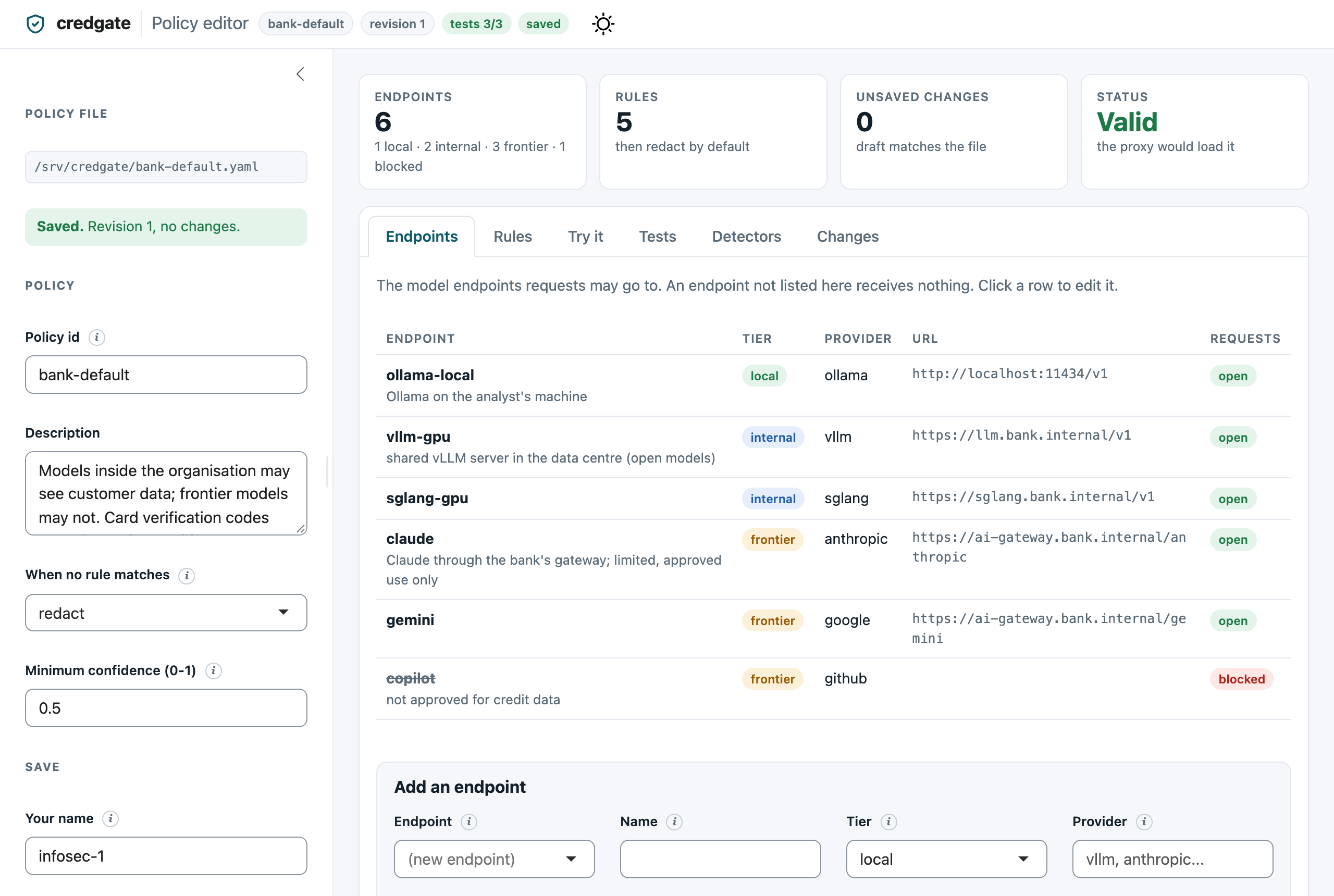
The policy editor is a small web app that lets InfoSec change a policy without editing YAML by hand. It comes in both packages - R (Shiny) and Python (Shiny for Python) - as the same app on the same files: a policy, its tests and change log saved by one can be opened by the other. It shows the policy's endpoints and its rules in order. You can try a sample text against any endpoint. It shows what changed before you save, and keeps a history of every save: who saved it, when, why, and what changed. It has light and dark themes (following the system setting, with a switch in the header), works on narrow screens, and explains every field in a tooltip. It loads nothing from the internet, so it runs on air-gapped machines.
# install.packages(c("shiny", "bslib"))
credgate::policy_editor("bank-default.yaml", user = "infosec-1")
pip install 'credgate[editor]'
credgate editor --policy bank-default.yaml --user infosec-1
In Python, credgate.editor.policy_editor() returns the app, for running it
under your own server (it is a standard ASGI app).
What it does
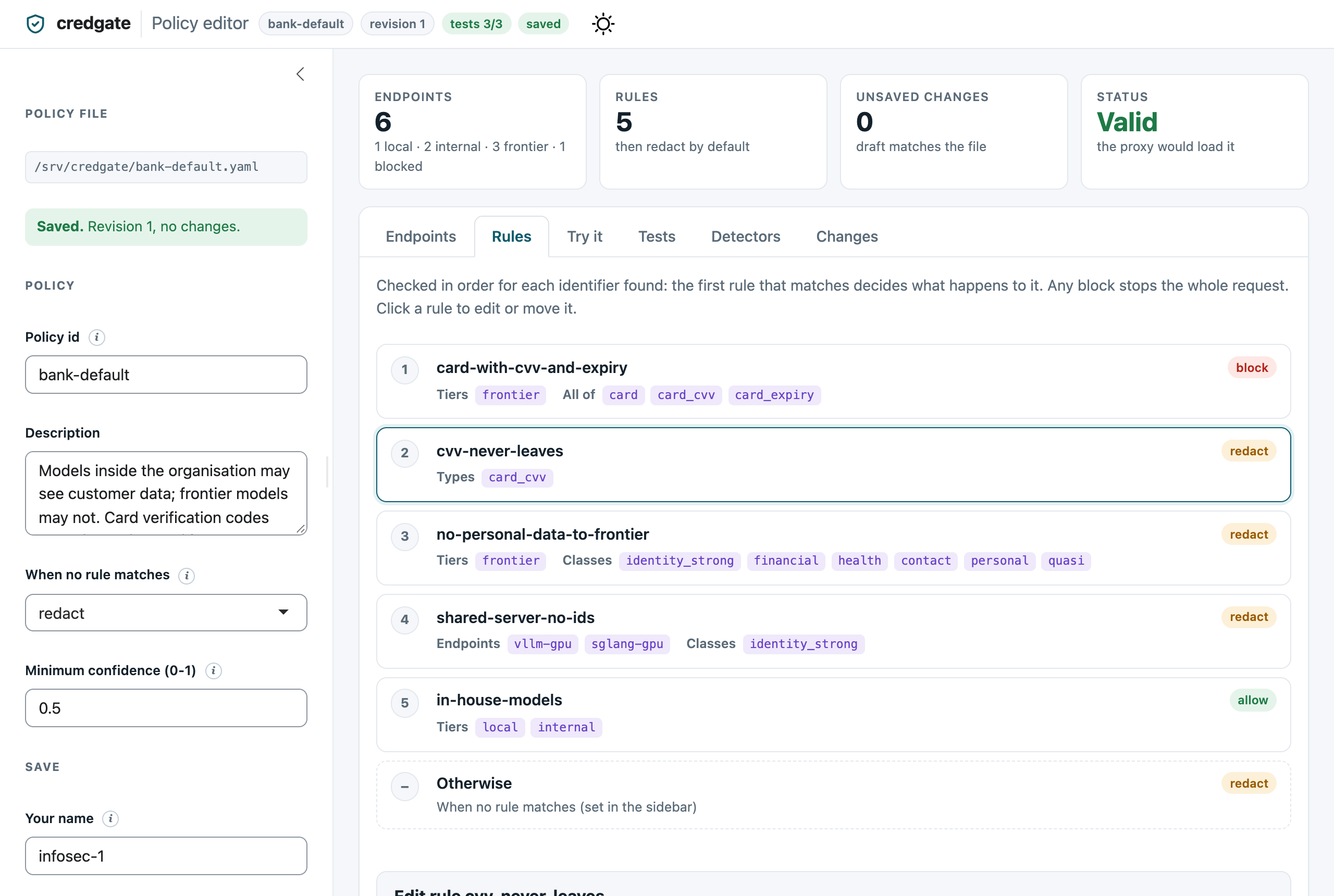
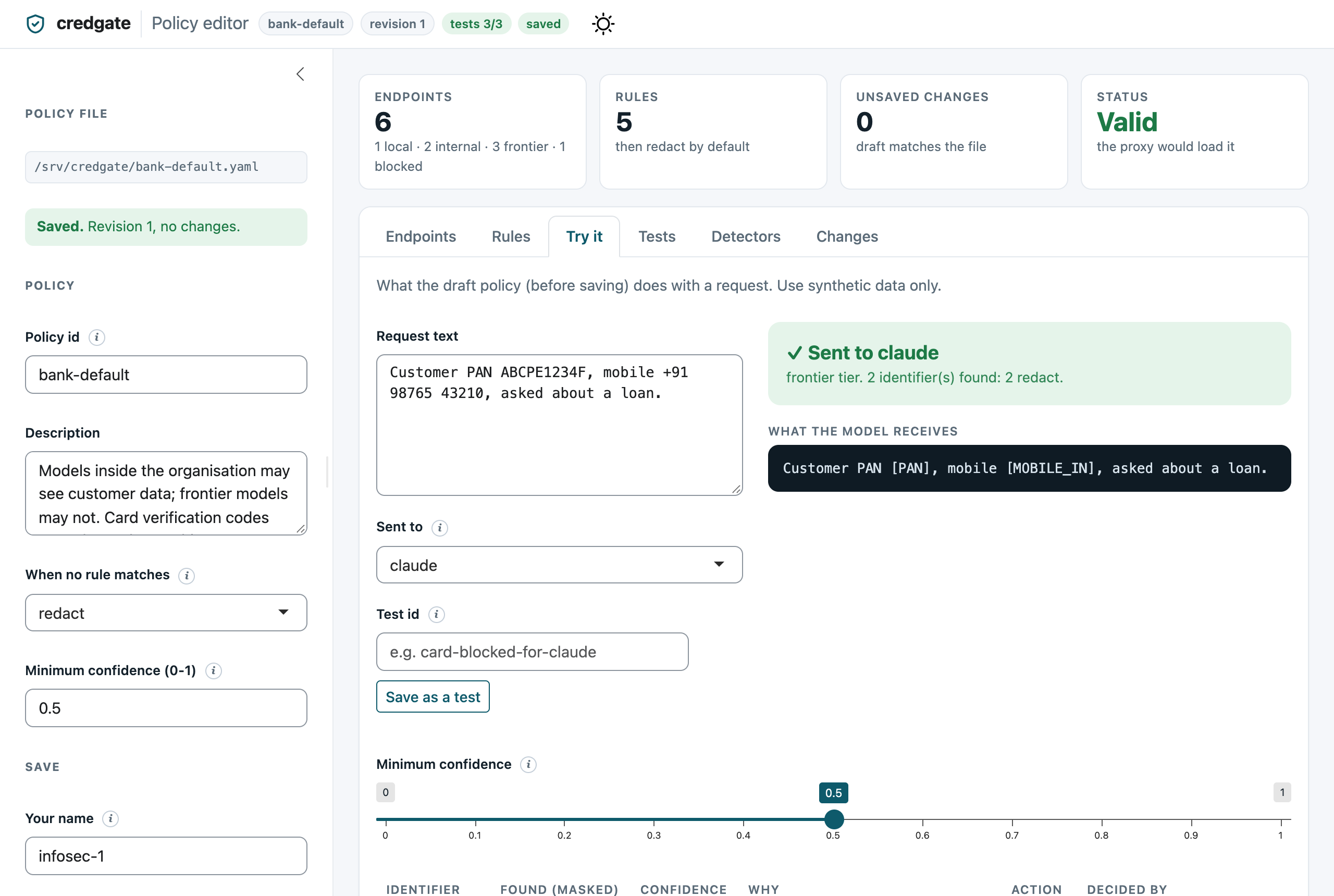
| Rules, in the order they are checked | Try it: what a model would receive |
|---|---|
 |
 |
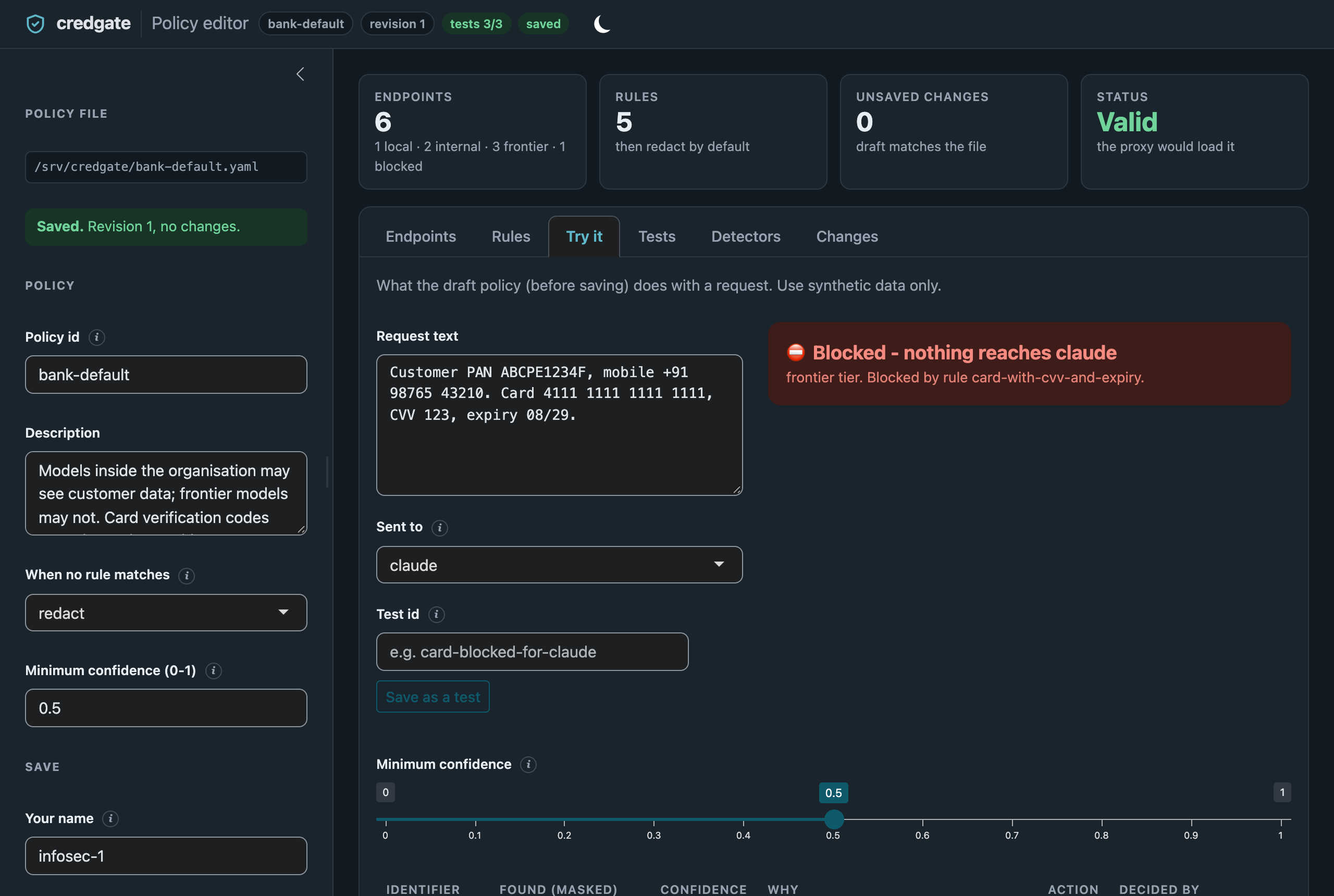
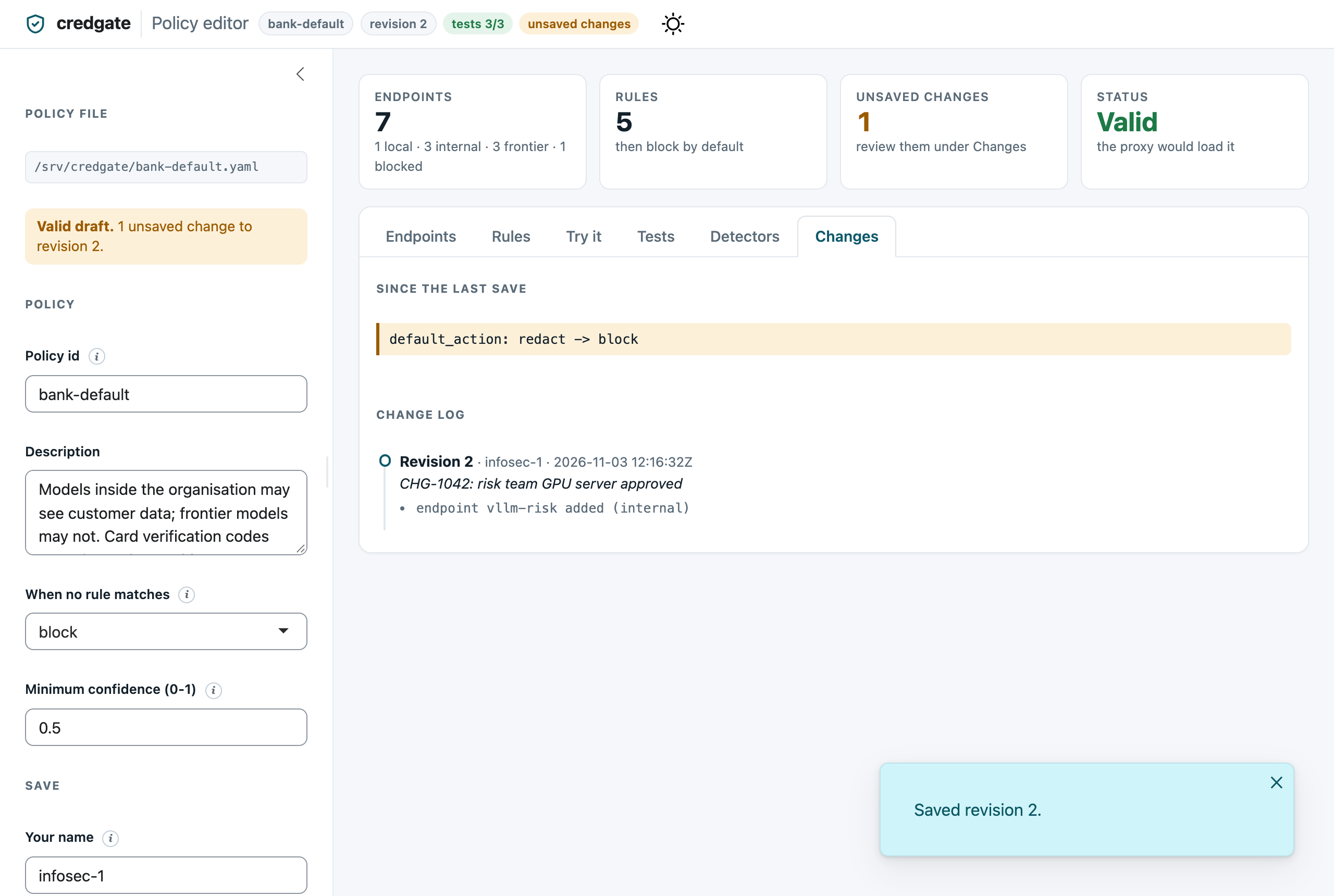
| Try it, blocked (dark theme) | Changes and the change log |
 |
 |
| Try it: why, and what was not reported | Tests: a draft change breaks one |
 |
 |
- Endpoints: add, change, block or remove the model endpoints that requests may go to. An endpoint that a rule still names cannot be removed. If you rename an endpoint, the rules that name it are updated too.
- Rules: add, change, remove and reorder rules. The first rule that matches decides the action, so order matters. Move a rule up or down to change it.
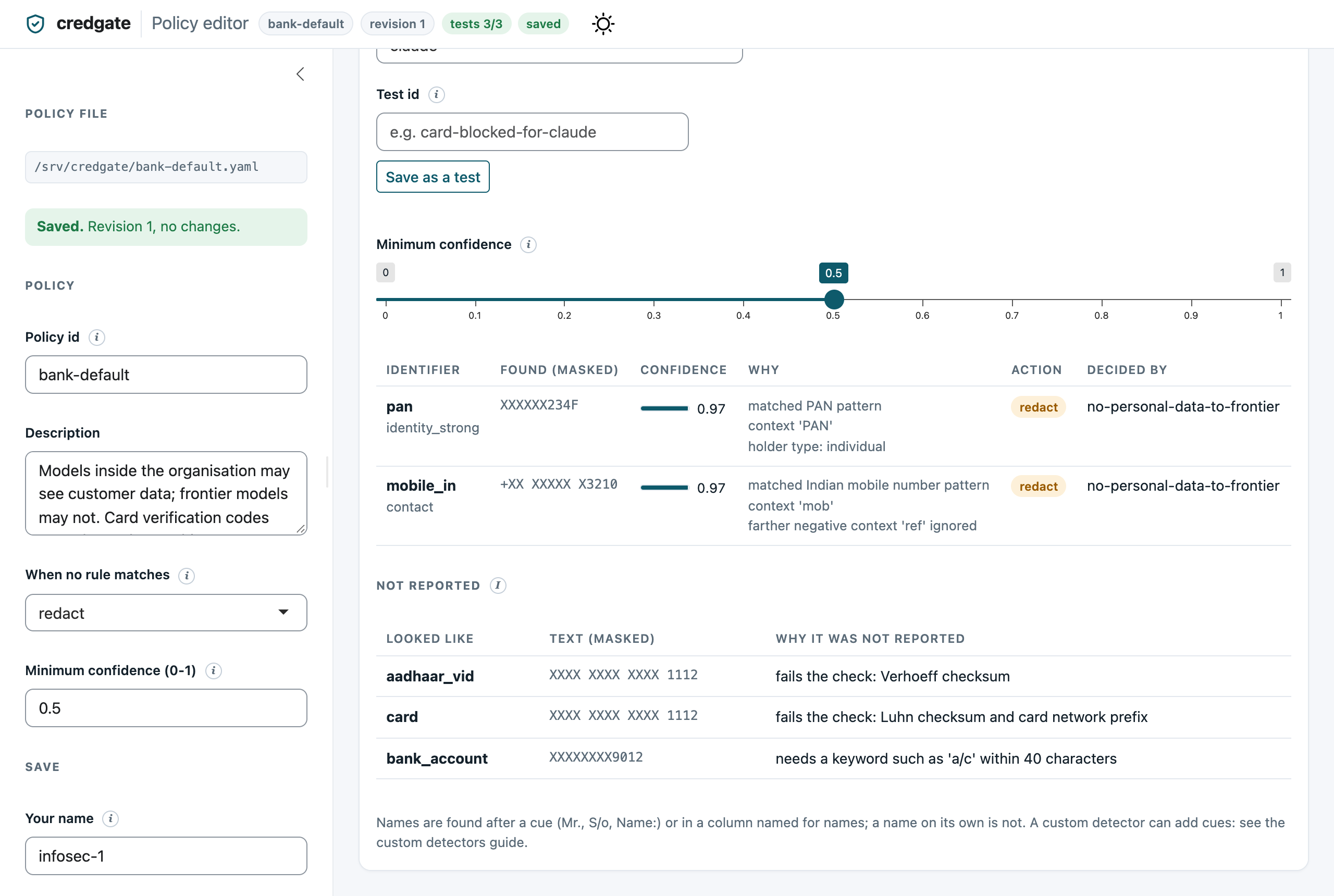
- Try it: paste a sample text (use synthetic data), pick an endpoint and see what the unsaved policy would decide, and which rule decided it. Detected values are shown masked. Each match shows its confidence and why it was found (the pattern, the checksum, the keyword nearby). Not reported lists what looked like an identifier but was dropped, and why: a failed checksum (a mistyped card number), a keyword the type needs ("a/c" for an account number), a confidence below the minimum, or a more confident overlapping match. The minimum-confidence slider is the policy's own setting: drag it to see what would be caught or let through.
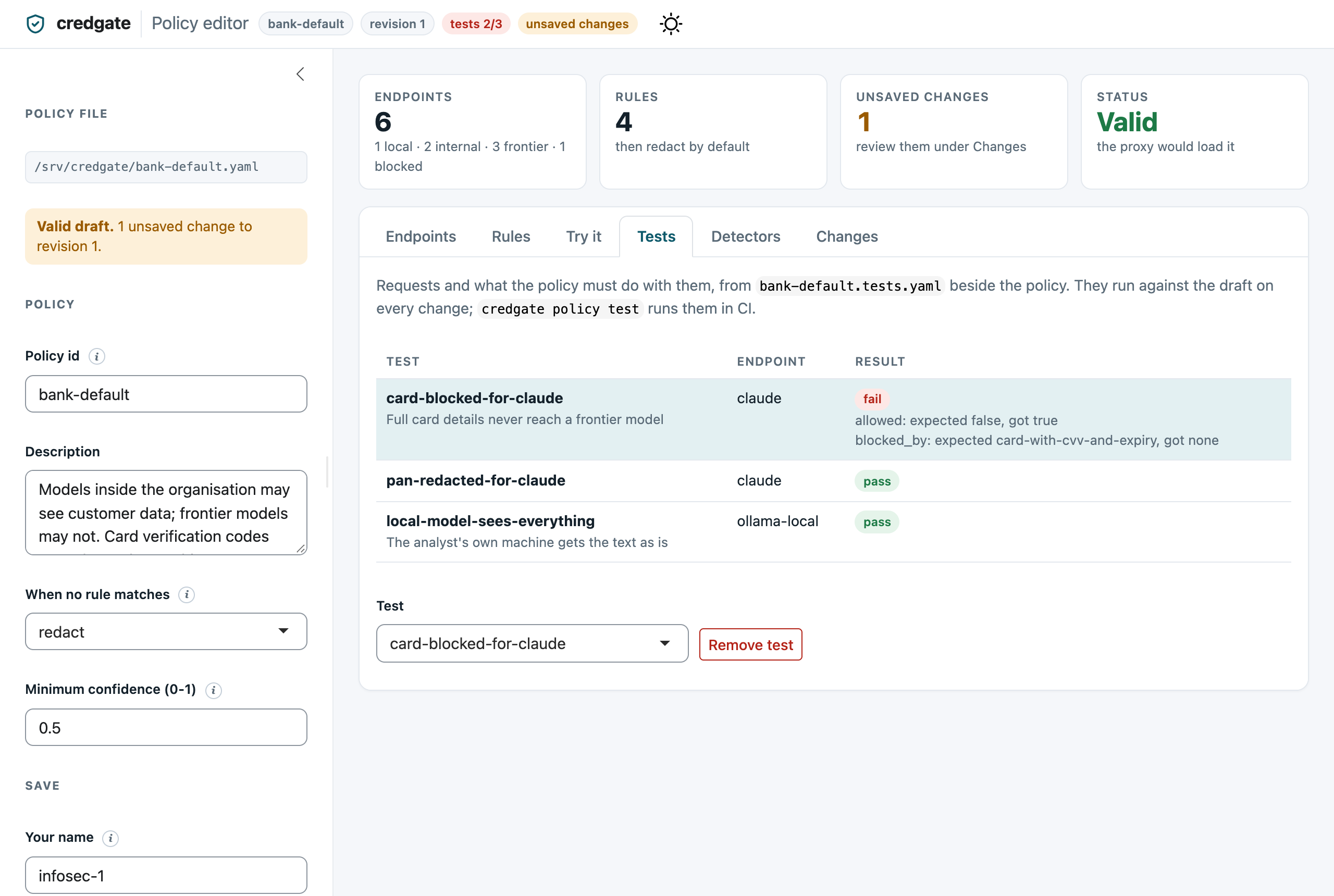
- Tests: sample requests and what the policy must do with them (see Policy tests below), run against the unsaved policy on every change. The header shows the score, such as "tests 3/3".
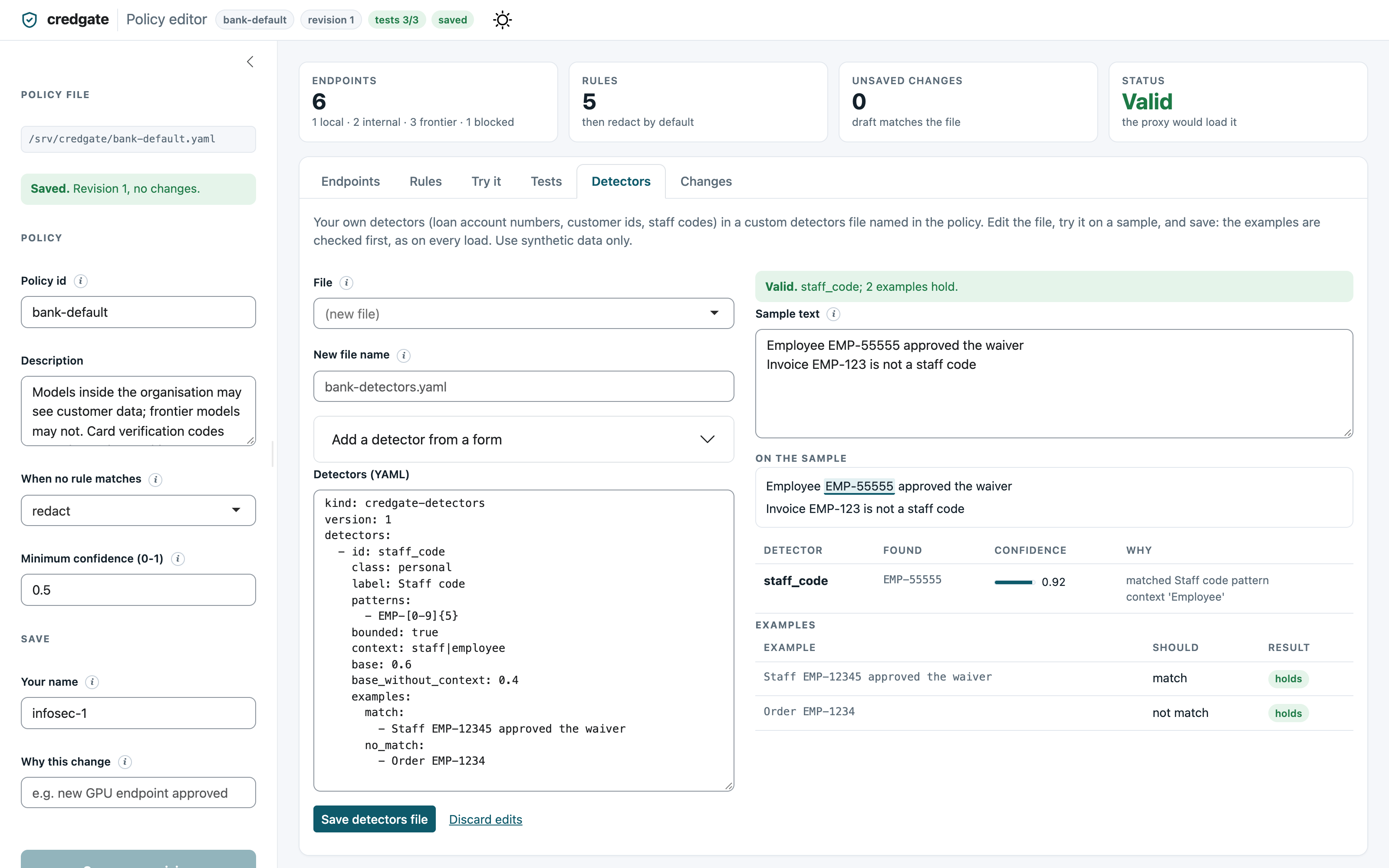
- Detectors: a workbench for the policy's custom
detectors. Edit a detectors file named in the
policy, or start a new one beside it, and see, as you type, what it finds
in a sample text (highlighted, with confidence and reasons, and what was
dropped and why) and whether each of its
examplesholds - amatchexample that is missed or ano_matchexample that is matched shows as failing. Add a detector from a form writes the YAML for you from an id, class, pattern, keywords and examples; edit it further by hand if you need fragments or lists. Saving checks the file exactly as credgate loads it, writes it, loads it into the editor and, for a new file, adds it to the policy'sdetectorslist. Save a new policy revision afterwards, so the audit log shows that the detectors changed. - Changes: what is different from the saved file, and the history of saves. The history is hash-chained like the audit log, so an entry that was edited or removed afterwards shows as broken.
Save stays disabled until the policy is valid and has changes, and
while a test fails. The
policy is checked exactly as the proxy loads it, so the editor can never save
a policy that the proxy would refuse. Each save raises the policy's
revision by one. The proxy and the audit log record that revision with
every decision.
Files
| File | What it holds |
|---|---|
bank-default.yaml |
The policy, written in a fixed layout |
bank-default.changes.jsonl |
One line per save: time, user, note, revisions, changes |
bank-default.tests.yaml |
The policy's tests (optional) |
Comments in a policy file are not kept when the editor saves it. Put
explanations in the description fields of the policy, its endpoints and
its rules, which are kept.
From R, without the app:
policy <- yaml::read_yaml("bank-default.yaml")
policy$destinations$copilot$blocked <- FALSE
policy_diff(yaml::read_yaml("bank-default.yaml"), policy)
policy_write(policy, "bank-default.yaml", user = "infosec-1", note = "Copilot approved")
policy_changes("bank-default.yaml")
Policy tests
A rule that looks harmless can change what happens to a request it was not meant for: rules are checked in order, and the first match decides. Policy tests pin down the behaviour that was agreed - "full card details never reach Claude", "PAN is redacted for frontier models" - so a later change that breaks it is caught before it is saved, not after a request leaks.
They live beside the policy, in bank-default.tests.yaml:
kind: credgate-policy-tests
version: 1
tests:
  - id: card-blocked-for-claude
    description: Full card details never reach a frontier model
    endpoint: claude
    text: Card 4111 1111 1111 1111, CVV 123, expiry 08/29
    expect:
      allowed: false
      blocked_by: [card-with-cvv-and-expiry]
  - id: pan-redacted-for-claude
    endpoint: claude
    text: Customer PAN ABCPE1234F
    expect:
      allowed: true
      actions: {pan: redact}     # every PAN found gets this action
      absent: [aadhaar]          # these types must not be found
      # output: "Customer PAN [PAN]"   # the exact text sent, if you want it
Only allowed is required. The full format is in the
specification.
In the editor, the Tests tab runs them against the draft on every change and shows each failure with its reason ("allowed: expected false, got true"). In Try it, once the decision for a sample is right, give it an id and press Save as a test: the text, endpoint, decision and the action for each type found are added to the tests file. While a test fails, Save is disabled. If the change is intended - the agreed behaviour itself changed - tick Save anyway and say why under "Why this change"; the change log records the reason and which tests were failing. Then update or remove the test.
In CI, run them whenever the policy or its tests change:
credgate policy test --policy bank-default.yaml
# PASS  card-blocked-for-claude
# FAIL  pan-redacted-for-claude
#       pan: expected redact, got tokenise
# 1 passed, 1 failed
It exits with 1 if a test fails and 2 if the tests file is not valid.
--tests names another file, and --detectors loads custom detectors. From
code: run_policy_tests("bank-default.yaml") in R and
credgate.run_policy_tests("bank-default.yaml") in Python, which read the
same files and give the same results.
Roles
With a users file, the editor shows each person what their role allows, and refuses the rest on the server (a hidden button cannot be used either):
| Admin (InfoSec) | Auditor | User (analyst) | |
|---|---|---|---|
| Endpoints and rules | change | see | - |
| Try it | the draft | - | the saved policy |
| Tests | add, remove, save anyway | see | see |
| Detectors | try and save | - | try |
| Changes | everything | everything | when the policy changed (not who or why) |
| Save a new revision | yes | - | - |
Anyone not in the file, or marked inactive, sees only "No access"; so does everyone if the file is not valid.
# users.yaml
kind: credgate-users
version: 1
users:
  priya: {role: admin}
  meera: {role: auditor}
  arjun: {role: user}
  ravi:  {role: user, active: false}   # a leaver
The file is kept on the server and changed only there, by whoever looks after the server (the super admin, who has no account in the app):
credgate users add priya --role admin --file users.yaml
credgate users set-role arjun --role auditor --file users.yaml
credgate users deactivate ravi --file users.yaml
credgate users list --file users.yaml
Names are the same as in the proxy's keys file, so a person's account and their proxy key match. With single sign-on, the file can be generated from directory groups (AD, LDAP) by a scheduled export.
Proxy keys in the editor
Given the proxy's keys file, everyone manages their own key under My
key: make one valid for 1, 3 or 6 months (up to the users file's
key_max_days, 90 days unless changed), make a new one (the old one stops
working), or delete it. The key is shown once, with a copy button; credgate
keeps only its hash. Admins also manage everyone's keys under
Users, which lists each person's role, access and key; auditors see
the list read-only. Every key made, renewed or removed is recorded in a
hash-chained access log beside the keys file (keys.access.jsonl), with
who did it and until when the key is valid, never the key itself;
proxy_access("keys.json") reads it in R.
My activity
Given the proxy's audit log (audit = "audit.jsonl"), everyone sees their
own recent requests under My activity: when, which endpoint, allowed
or blocked and by which rule, and how many identifiers were redacted,
tokenised or allowed - never the request's content, which the audit log
does not hold. It shows the last 7 days and at most 100 requests (the users
file's activity_days and activity_max), and reads only the monthly
audit files that can hold them.
Trying the roles locally, without single sign-on, name the person:
credgate::policy_editor("bank.yaml", user = "arjun", users = "users.yaml",
                        keys = "keys.json", audit = "audit.jsonl")
credgate editor --policy bank.yaml --user arjun --users users.yaml \
  --keys keys.json --audit audit.jsonl
On a server, the signed-in user is used: with single sign-on in front, the
name comes from the sign-in proxy's header (trust_header); see
Deployment. Without a users file, everyone is an admin, as
before.
Running it for a team
Run it behind the organisation's single sign-on, listening on 127.0.0.1
and trusting the header the sign-in proxy sets; see
Deployment. In Python:
credgate editor --policy /srv/credgate/policy.yaml --users /srv/credgate/users.yaml \
  --keys /srv/credgate/keys.json --audit /srv/credgate/audit/audit-proxy1.jsonl \
  --trust-header X-Auth-Request-User --host 127.0.0.1 --port 3838 --no-browser
On Shiny Server or Posit Connect (R), put this in an app.R:
credgate::policy_editor("/srv/credgate/bank-default.yaml",
                        user = Sys.getenv("SHINYPROXY_USERNAME", "unknown"))
Without user, the editor fills in the signed-in user that Shiny reports
(session$user), or else the operating-system account. The name field stays
editable, so treat it as a record of who said they saved it. Rely on the
server's sign-in to control who can reach the app. Only people allowed to change the
policy should be able to reach the app. It writes the policy file, so run
it under an account that can write that file and nothing else.
The proxy reads the policy when it starts. Restart it (or its workers behind the load balancer, one at a time) to apply a saved change.