Custom detectors
credgate's built-in detectors cover Indian identifiers - Aadhaar, PAN, cards, UPI and more. Every organisation also has its own: loan account numbers, customer ids, employee codes, internal reference formats. Custom detectors add them in a YAML file, in the same format as the built-in ones, and the same file works everywhere: in R and Python, on the command line, in policies and in the proxy.
This guide builds one example, a name detector that needs no list of names, and shows it on text, data frames, policies and the proxy. The full format is in the specification.
A first detector
kind: credgate-detectors
version: 1
detectors:
  - id: loan_account
    class: financial             # one of the seven data classes
    label: Loan account number
    patterns: ['LN[0-9]{10}']
    bounded: true                # not inside a longer token
    context: 'loan|\ba/c\b'      # nearby words that raise confidence
    base: 0.6                    # confidence with context ...
    base_without_context: 0.4    # ... and without (below the usual 0.5)
    examples:                    # checked every time the file loads
      match: ['Loan a/c LN0012345678']
      no_match: ['LN00123']
Every field of the built-in detectors is available: validators (luhn,
verhoeff, gstin), negative context words, context_required, a named
capture group, and column_label for table columns. A file may define its
own fragments (reusable pieces of regex) and lists (words), and use the
built-in ones.
credgate checks everything when it loads a file, and refuses it rather than half-loading it:
- unknown fields, ids that are not lower case, a
classpolicies do not know; - an id of a built-in detector - a custom file cannot change or weaken one;
- every
examplesentry: amatchtext that is not found, or ano_matchtext that is, refuses the file and says which example failed.
The examples are what make a custom detector trustworthy: they are tests that run every time, on every machine, in R and Python alike.
Example: names from the words around them
The built-in person_name detector finds a name after a title ("Smt."), a
relation ("S/o") or a label ("Name:"). Call-centre notes and chats often have
none of these - "Lakshmi Verma called about her loan" - so the name is missed.
Rather than a list of every Indian name, names-by-cue.yaml
looks for the cues such notes do have:
| Cue | Example |
|---|---|
| A person did something | "Lakshmi Verma called", "Kavya Gupta said she paid" |
| Someone spoke to or paid a person | "Spoke with Rahul Nair", "Transferred to Imran Khan's account" |
| A role word before a name | "Customer R. K. Sharma wants a statement", "Borrower Neha Rao" |
| A greeting or sign-off | "Hi Anil,", "Regards, Sunita Devi" |
| A column named for names | a customer_name, borrower, nominee or नाम column: every value (the built-in person_name does this too) |
And it avoids what looks like a name but is not: "Customer Service called",
"Hi Team", "the Branch Manager", "Payment Gateway called back", "Received
from ICICI Lombard", "Monday Morning". Those words are in the file's
not_person_words list - add your own organisation's team, product and
brand names there.
How well it works
On the labelled corpus (dev split), adding it to the built-in detector finds every name - 241 of 241, up from 224 - with no false matches. On 358 paragraphs of credgate's own documentation it matched only the synthetic example names the docs use. The corpus has only a few kinds of sentences without a cue, so expect lower recall on real notes; the file's examples document what it is designed to catch and to avoid.
It deliberately does not report:
- one word before a verb ("Arjun called"): a capitalised first word of a sentence is too often not a name. After a greeting or a role word one word is enough ("Hi Anil").
- names in lower case outside a name column ("spoke with priya nair"): in chats, too many ordinary words would match.
On text
import credgate

credgate.load_detectors("names-by-cue.yaml")
credgate.redact(["Lakshmi Verma called about the EMI", "Spoke with Anil Kumar"])
# ['[NAME_BY_CUE] called about the EMI', 'Spoke with [NAME_BY_CUE]']
library(credgate)
load_detectors("names-by-cue.yaml")
redact(c("Lakshmi Verma called about the EMI", "Spoke with Anil Kumar"))
You can also say what a value is: context= is applied to every value as if
it were written next to it, so a list that you know holds names is read as
names, in any letter case:
credgate.redact(["priya nair", "Rahul Verma"], context="customer name")
# ['[NAME_BY_CUE]', '[NAME_BY_CUE]']
On data frames
Column names count as context, so a column named for names is recognised from its name:
import pandas as pd

df = pd.DataFrame({
    "customer_name": ["priya nair", "Rahul Verma", "सुनीता देवी"],
    "notes": ["Lakshmi Verma called about the EMI", "Spoke with Anil Kumar", "no change"],
    "branch": ["Pune", "Mumbai", "Delhi"],
})
credgate.scan_pii(df)
# customer_name  name_by_cue  3 of 3
# notes          name_by_cue  2 of 3
df <- data.frame(
  customer_name = c("priya nair", "Rahul Verma", "सुनीता देवी"),
  notes = c("Lakshmi Verma called about the EMI", "Spoke with Anil Kumar", "no change"),
  branch = c("Pune", "Mumbai", "Delhi")
)
scan_pii(df)
pii_inventory(), the Spark, BigQuery and database scans use the same
detectors, so the inventory of a whole warehouse includes them.
In a policy
A policy names its custom detector files in a detectors list, relative to
the policy file. They are loaded before the rules are checked, so rules can
name their types - or simply their class:
policy: credgate-policy
version: 1
id: bank-default
revision: 4
detectors: [names-by-cue.yaml]
destinations:
  claude: {tier: frontier, provider: anthropic, url: "https://api.anthropic.com/v1"}
rules:
  - id: names-tokenised-for-frontier
    when: {tiers: [frontier], types: [person_name, name_by_cue]}
    action: tokenise
  # or: classes: [personal] covers both, since name_by_cue is `personal`
default_action: redact
The policy editor keeps the detectors list when it saves, and the change
log records changes to it. Tokenising names (rather than redacting them)
lets the model refer to "[NAME_BY_CUE_1]" and you read the real name in the
answer.
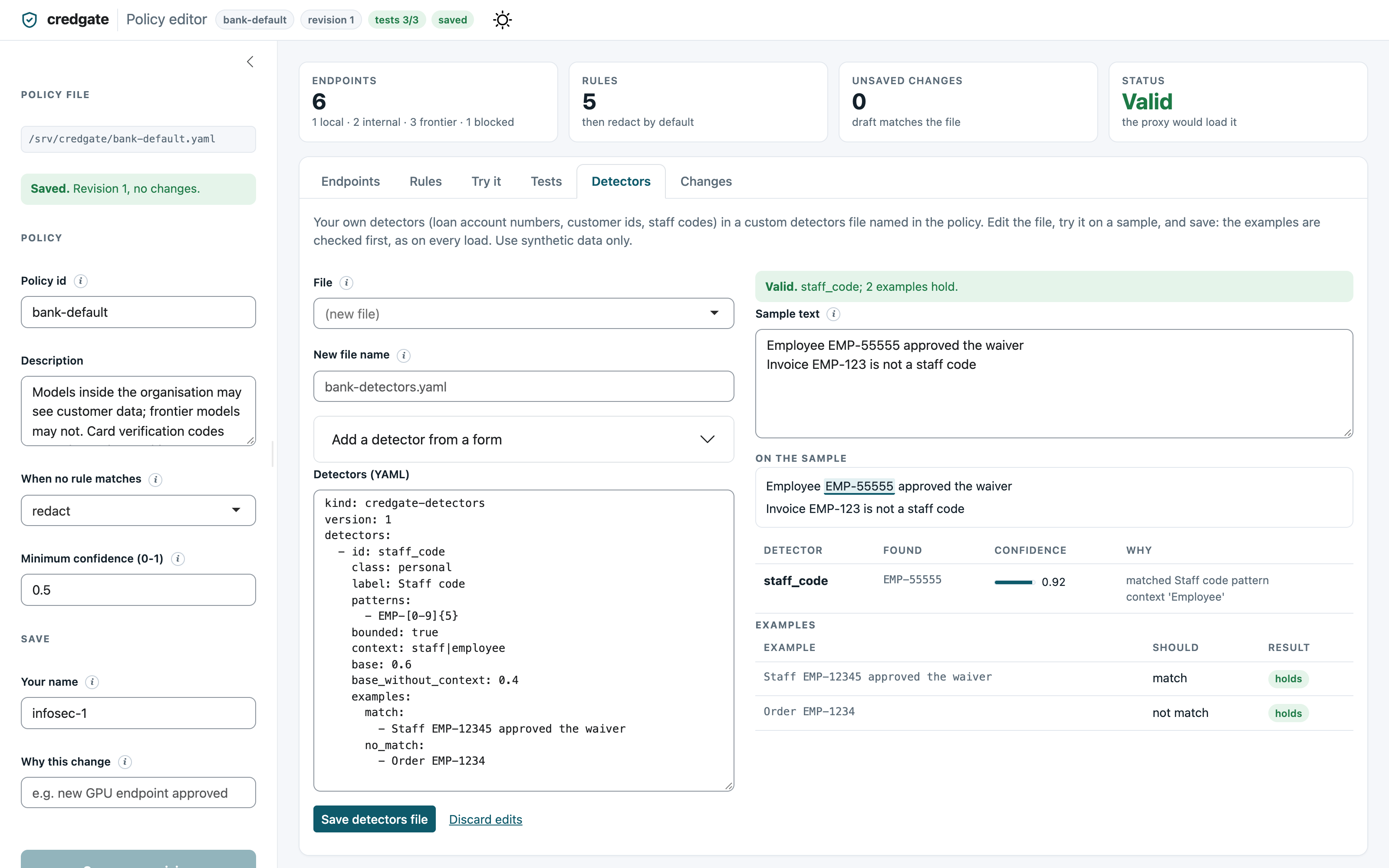
In the policy editor
The policy editor's Detectors tab is a workbench for these files: write a
detector with a form (id, class, pattern, keywords, examples) or edit the
YAML, try it on sample text as you type - matches highlighted with their
confidence and reasons, and what was dropped and why - and see every
examples entry pass or fail. It saves only a file credgate would load,
and adds a new file to the policy's detectors list. See the policy
editor guide.
On the command line
credgate detect --detectors names-by-cue.yaml notes.txt
credgate redact --detectors names-by-cue.yaml < notes.txt
credgate scan --detectors names-by-cue.yaml customers.csv
credgate detectors --detectors names-by-cue.yaml   # lists them; refuses a file whose examples fail
--detectors can be given more than once. credgate detectors --detectors
file.yaml is also a quick check for CI: it exits with status 2 if the file
is not valid or an example fails.
In the proxy
Either name the file in the policy (above), or pass it when starting:
credgate proxy serve --policy bank-default.yaml --audit audit.jsonl \
  --detectors names-by-cue.yaml
Every request through the proxy - Claude Code, Copilot Chat, ellmer, the
SDKs - is then checked with it, and the audit log records name_by_cue
like any built-in type.
Other approaches for names
A cue-based detector is one of several ways to catch names; they combine well.
- Say where the names are. If you know a column or a field holds names,
say so: the built-in detectors read every value of a column named for
names (
customer_name,first_name,nominee,borrower,नाम) or for addresses (permanent_address,addr_line1,पता) as one, and so doescontext="customer name"on values you pass. Only whole labels count, soproduct_nameandemail_addressdo not. This is the most reliable method, because it does not depend on how a name is written. If your systems use other column names, a custom detector'scolumn_labeladds them. - Policies that protect free text. For external models, a policy can
redact or tokenise the whole
personalclass, and usedefault_action: redact, so whatever a detector finds in free text does not leave. - Your own lists. A file's
listscan hold names you know matter - key customers, staff, partners - as literal words. Lists are joined into a pattern, so they suit hundreds of entries, not millions. Do not put a customer master in a file that is copied widely. - A local model as a second opinion. A small model running on the machine (for example through Ollama) can spot names in difficult text before it is sent anywhere. It is slower and less predictable than rules, so use it as an extra check, not instead of them.
- Matching against your customer master. Comparing values with keyed hashes of known customers' names would find them without copying the names around. This is on credgate's roadmap.
Tips
- Keep examples honest. Add a
no_matchexample for every false match you fix, so it cannot come back. - Keep patterns simple. Custom patterns run on every text: avoid nested
repetition such as
(a+)+, which can be slow on long inputs. - Version the file with the policy. Keep custom detectors next to the
policy, change them through review, and raise the policy's
revisionwhen they change, so the audit log shows which rules applied.